How it's built, patched and set up for its played test. The numbers are under Test runs.
Offline play: the client has no robots option in its menus. Public servers often require a registered
account (a callsign registered at forums.bzflag.org, used with its password), and several refuse an
unregistered player to spawn. Computer tanks (robots) are the offline way to play: start “BZFlag (robots)”
from the menu (it runs bzflag -solo 3), choose Start Server, then Connect to localhost; the three robots
join whichever server the client joins.
Status
Debian’s bzflag-client, bzflag-data and bzflag-server 2.4.30-4 from debian-ports, unchanged (about 20 MB
installed). It runs: smoke run on 2026-10-28 (kernel .874, Mesa ps3.924; runs
ps3-bench-20261028T194448Z and T194805Z): the client joins a bzfs on the console with three robot tanks,
fullscreen at 1920x1080 (geom=1920x1080+0+0 fs=1), the robots fight each other, our tank spawns on i and
drives. The Gallium HUD over the 90 s window: 59 fps steady, 1% low 30, one frame over 100 ms (243 ms, the
screenshot’s capture), 136% CPU (client, robots and server together), 65 MB RSS, 48 MB of VRAM, 23 MB of
GART. Sound ran (RUNNING, 18 dropouts logged, 1 audible). Not checked yet: the sound by ear, the pad, a long
match.
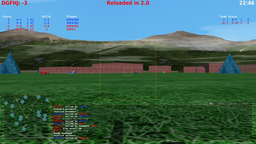
The picture: world, tanks, pyramids, boxes, shots, radar, HUD and the console text are drawn; the sky and
ground are dark even at -time 12:00:00, and the PC reference (llvmpipe at GL 2.1, make bench-ref GAME=bzflag) is just as dark on its join screen, so that is the game’s look, not the RSX. (The PC run itself
never joined: “World cache files disappeared. Join canceled”, a cache directory the container lacks.)
Smoke-tested: one launch to see whether it starts and plays (SUITE=0, no benchmark numbers kept; the smoke
runs are described in SUITE.md). The recipe
(benchmark/recipe.sh) starts bzfs on port 5154 (a generated world, jumping,
teleporters, ricochet) and the client with -solo 3 smoke@127.0.0.1:5154, which connects at once; XTEST
presses i (spawn) and Up 10 s after the window. The client is fullscreen unless -window is given, at
the screen’s resolution, so no console default needs a patch.
Controls: the mouse steers by default (allowInputChange switches to the keyboard or a joystick when one is
used). Debian’s build opens no joystick until Options > Input Settings names one (joystickname, unset) and
binds none of its buttons.
Our package: the pad as it comes
bzflag 2.4.30-4+ps3.N (packages/bzflag), 0001: a DualShock plays with no setting.
joystickname defaults to auto (the first SDL game controller, else the first joystick, else none and no
error message). A game controller is opened through SDL’s game controller API, so its buttons and left
stick are read by their place on the pad, whatever the driver numbers them, and get default bindings:
Cross and R2 fire, Square and L2 jump, Circle drops the flag, Triangle identifies, L1 the binoculars,
Select the score; the left stick drives (the input switches to the joystick when it moves). Where the
buttons become key events, Start is Escape (the menu), the D-pad the arrow keys, and in a menu Cross is
Return and Circle Escape. The keyboard and mouse are unchanged; a saved configuration keeps its own
joystick and bindings. On the PC (amd64 build, a virtual DS3 through uinput) every part worked: Start
opened the menu, the D-pad moved, Circle closed it, Triangle spawned the tank, Cross fired, the stick drove.
On the PS3 (2026-10-29, the dev build): the keyboard path is unchanged (57 fps, no joystick message), and
with the recipe’s virtual pad (variant pad, smoke.inc smoke_pad, a made-up ID with the console’s own DS3
hidden) Start, the D-pad and Circle work the menu, so bzflag opens the pad as a game controller; but
Triangle never spawned the tank (three presses from 40 s, ps3-bench-20261029T053020Z-smoke-bzflag-pad) and
the start line kept naming “i”. Open: whether the virtual pad’s Triangle arrives as SDL’s Y there (the
generic ID maps BTN_WEST as Y on the PC), or the spawn binding; a real DS3 in a played session decides.
Robots and public servers
Robots are client-side: bzflag -solo N makes the client, after it has joined a server, open N more
connections to it as computer players (playing.cxx addRobots, called once the main tank is accepted; a
server started with -disableBots refuses them). It does not matter how the server was reached, so the
menu’s Start Server (which runs bzfs itself, ServerStartMenu.cxx) followed by Connect gets the robots too.
Our launcher “BZFlag (robots)” (desktop/launchers/bzflag-robots.desktop)
starts bzflag -solo 3 through ps3-game; “BZFlag” starts without them.
A default callsign (2026-10-30), so a pad player never needs the keyboard: BZFlag 2.4 has no -callsign
option, but its last argument callsign[:password]@server[:port] takes an empty server, and bzflag -solo 3 Player@
starts at the main menu (no automatic connection: playing.cxx connects only with both a callsign and a server)
with “Player” in the Join Game menu. Start Server fills in localhost:5154, so Connect joins with no typing. The
command line overrides the saved callsign, so the launcher passes Player@ only while ~/.bzf/2.4/config.cfg
has no set callsign line (a callsign equal to the default, empty, is written commented out as #set callsign "");
the game saves “Player” there at exit (saveIdentity 2), and a callsign the player types later is kept. On the PC
(Debian’s 2.4.30 amd64 under Xvfb, keys by xdotool): the first start showed Callsign: Player, Start Server > Start,
Connect joined the green team as Player with the robots Player00-02; the config then had set callsign Player,
and the second start (through the config branch) showed Player again. On the PS3 (2026-10-31,
ps3-games-integration 0.1159, a config without a callsign, keys by XTEST): the same, with the menu’s
ps3-game start in game mode: Callsign: Player, Start Server > Start (“Server started.”, bzfs running),
Server: localhost, Connect joined the Purple team as Player with Player00-02 as robot tanks, the tank
spawned, Quit saved set callsign Player. The DualShock-only run is still to do.
Public servers (the Join Game > Find Server list, 244 listed on 2026-10-29) often require a registered account: the session of 2026-10-29 was refused with “This callsign is registered. You must use global identification before playing”, “This server may require identification before you can join” and “You are not allowed to spawn. Please contact an administrator”. Robots on a local server are the offline way to play.
Played session 2026-10-29
8.3 minutes, quit, one DualShock 3 (pad events through the session), the form: sound yes, controls full, no glitches, menus and modes worked. About 485 s of recorded play time, but the screenshots show the time: the Start Server and Join Game menus, the public server list (244 servers) and public servers that disconnected the player (callsign registered, or not allowed to spawn); one local match (the screenshot at 120 s: green team, flag grabbed, radar and HUD drawn). Median 70 fps, 1% low 27 (the frames counted are mostly menu frames), 6.8 s of stutter a minute, one 26.6 s frame at about 190 s: the client was connecting to a public server (“Downloading texture (11 of 11)”, the screenshot at 180 s) and the frame timer saw no frame for that time (a wait in the menu, not a slow draw). Rating: Rust (72), smoothness 0 from that frame. Sound: 18 dropouts logged, 1 audible. The 2026-10-29 session’s launcher was “BZFlag” (no robots).
Research
What the surveys and plans said about it, newest first; each line names its source, the section and the date.
- 2026-10-16, game-candidates.md, “Candidates”: BZFlag 2.4.30, Debian
bzflag-client(18 MB); builds on ppc64; fixed function, GLEW: tier A; small RAM; no benchmark mode; its own mixer on SDL. Verdict for the suite: no.
Build
| Packages | bzflag-client, bzflag-server |
|---|---|
| Suite | in the game suite (known to run with its sound), free data |
| Game data | comes with the packages |
Our source packages
- bzflag source
Played test
What a played session sets up (rating/test.toml); the medal comes from these sessions only.
| Process | bzflag |
|---|---|
| Set aside | ~/.bzf (the game starts on fresh defaults) |