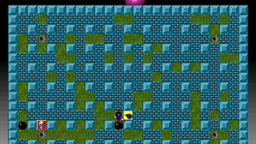
How it's built, patched and set up for its played test. The numbers are under Test runs.
BomberClone is Debian’s 0.11.9-9 (SDL 1.2 on sdl12-compat) with three patches of ours: a clean exit, full screen by default, and gamepads in the menus. One played session of about 5 minutes against bots held a median of 50 frames a second (1% low 28) at 1920x1080, with the picture at 4:3 and black bars at the sides. It never crashed, and the sound effects and music were heard. The DualShock played matches fine, but in that session the menus ignored it because they read the keyboard only. Our patch makes the pads work them, checked on the PS3 with a virtual pad but not yet in a played session. The HUD text is 12 px high at 1080p.
BomberClone 0.11.9, an Atomic Bomberman clone (SDL 1.2 on sdl12-compat, up to 8 local or network players), is Debian’s 0.11.9-9 with two patches of ours. Its played session (2026-10-26, about 5 minutes against bots) had a 50 fps median, no crash, the picture right (4:3 with bars at the sides) and the sound effects and music heard; the gamepad works in matches but not in the menus.
Packages and patches
bomberclone, bomberclone-data (0.11.9-9+ps3.N, packages/bomberclone),
replacing Debian’s; in no suite.
- 0001:
main()returned aftergfx_shutdown()withoutsnd_shutdown()orSDL_Quit(), so SDL_mixer’s audio thread was still running whileexit()ran the libraries’ destructors. With SDL 1.2 provided by sdl12-compat (over SDL2 and SDL3, as in Debian now) the thread then called into torn-down state, and the game segfaulted on every quit, from the menu or on SIGTERM. Now it closes the audio and SDL first. - 0002: full screen by default (it started in a 640x480 window on the desktop); the saved config and the Options menu still change it.
- 0003: the pads work the menus
(they read the keyboard only): every menu and wait-for-a-key screen reads events through
s_fetchevent, which now hands them a pad’s hat or first stick as the arrow keys, the first button as Return and the second as Escape (Cross and Circle on a DualShock 3), and a DualShock 3’s D-pad buttons and Start too. In a match a DualShock 3’s Start opens the game menu (which the pad then works) and its D-pad moves as the stick does (any pad’s hat too). Tried on the PC with a virtual DS3 (evemu, the hid-sony layout): the main menu, the manual’s pages and back. On the PS3 (2026-10-29, the dev build,run.sh smoke bomberclone pad, the virtual DS3 beside the console’s own): the pad’s events moved through the menus with no key (the Configuration menu open at 20 s, the highlight on its “Ok” at 40 s;ps3-bench-20261029T000433Z-smoke-bomberclone-pad).
How it performs
Played (rules 2.0, Mesa ps3.860, kernel .786, bomberclone ps3.758): 50 fps median, 1% low 28, 2.1 s of
stutter a minute with a 2.4 s longest frame, a 16.5 s load, 62 MB RSS. The sound: 219 xruns, one audible
dropout in the play (9 more around the screenshots, the recorder’s own). The player quit from the menu, cleanly.
The played test (rating/test.toml) sets its settings file ~/.bomberclone.cfg aside per
session; the recipe (benchmark/recipe.sh) is for sessions only, no benchmark.
Known problems
- The gamepad worked in matches but not in the menus: BomberClone’s menus read the keyboard only (as on the PC). 0003 makes the pads work them (checked on the PS3 with a virtual DS3; a real pad in a played session is still to come).
- The HUD text is small at 1080p (12 px: Player1, Bombs, Range, Speed at the top).
Build
| Packages | bomberclone, bomberclone-data |
|---|---|
| Suite | not in the game suite yet |
| Game data | comes with the packages |
Our source packages
- bomberclone source
Played test
What a played session sets up (rating/test.toml); the medal comes from these sessions only.
| Process | bomberclone |
|---|---|
| Set aside | ~/.bomberclone.cfg, ~/.bomberclone (the game starts on fresh defaults) |
| Command | /usr/games/bomberclone |